Raspberry Pi NOOBS Download: A Complete Guide for Beginners

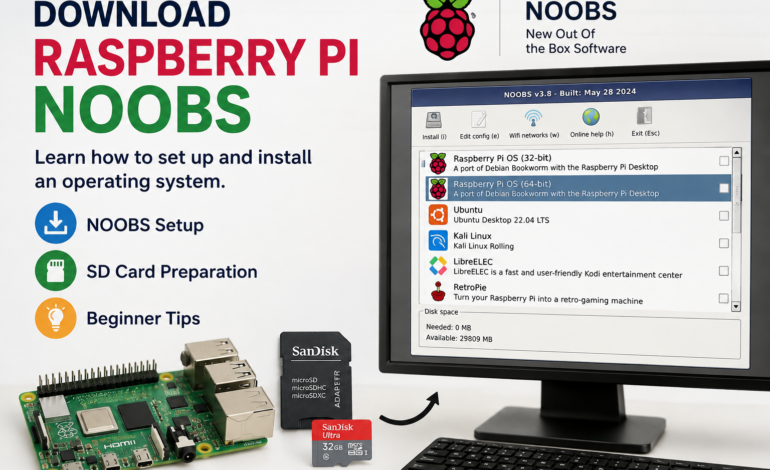
Finding the right Raspberry Pi NOOBS download can be confusing when older tutorials and newer installation methods appear together. NOOBS was created to simplify operating-system installation for Raspberry Pi beginners. Although it is now a legacy solution, understanding its purpose remains useful for users working with older Raspberry Pi projects.
This guide explains Raspberry Pi NOOBS, its original installation process, the role of the NOOBS installer, and its relationship with Raspberry Pi OS. It also explains why modern users should consider the current Raspberry Pi installation workflow instead.
What Is Raspberry Pi NOOBS?
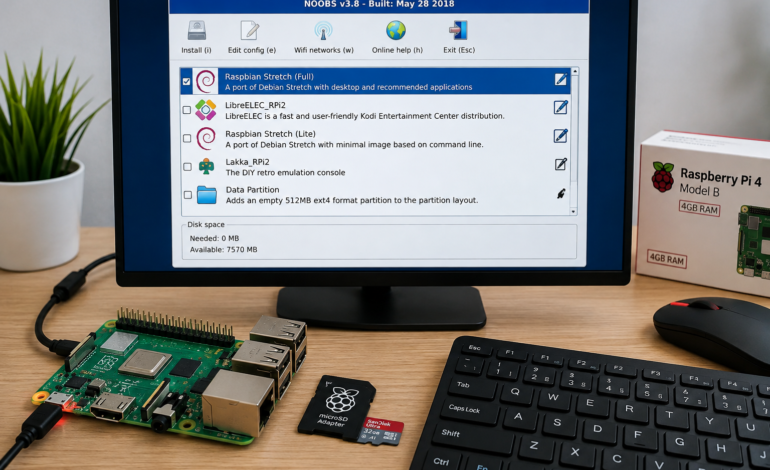
Raspberry Pi NOOBS stands for “New Out Of Box Software” and was designed to simplify operating-system installation for beginners. It provided an accessible interface where users could select an operating system without manually handling complicated image-writing procedures. This made the initial Raspberry Pi setup easier for people with limited technical experience.
NOOBS itself was not a complete operating system like Raspberry Pi OS. Instead, it functioned primarily as an installer and recovery environment for Raspberry Pi computers. It helped users prepare their device and choose a suitable operating system through a straightforward installation interface. This beginner-focused approach made Raspberry Pi more approachable.
The original NOOBS software was particularly useful for people unfamiliar with Linux and operating-system installation. Rather than requiring users to understand disk images immediately, the installer presented a more visual method for getting started. This reduced the technical friction associated with preparing a Raspberry Pi for its first boot.
Is Raspberry Pi NOOBS Still Available?
The search for NOOBS download often leads to older guides, archived resources, and discussions about previous Raspberry Pi installation methods. These resources can still provide historical information about NOOBS and its original purpose. However, users should understand that NOOBS is no longer the recommended installation method for new Raspberry Pi systems.
For a legacy project, researching the appropriate Raspberry Pi NOOBS installer may still be relevant. Older Raspberry Pi configurations sometimes depend on installation procedures that were common when NOOBS was actively maintained. Compatibility should therefore be checked carefully before using an archived package.
Modern Raspberry Pi users have a more streamlined alternative through Raspberry Pi Imager. The newer approach reduces manual preparation and provides a more contemporary method for selecting and installing an operating system. Consequently, old NOOBS instructions should not automatically be treated as current setup guidance.
How Does NOOBS Work on Raspberry Pi?
Understanding how does NOOBS work on Raspberry Pi starts with its role as an installation environment. Users traditionally downloaded the NOOBS package, prepared a compatible storage card, and copied the required files onto it. The Raspberry Pi could then boot from the prepared card and load the NOOBS interface.
Once the interface appeared, users could review the available operating-system choices and select an appropriate option. The installer handled the initial operating-system preparation instead of requiring beginners to manually write an image. This made the installation workflow considerably easier for inexperienced users.
The approach was especially useful for people searching for a Raspberry Pi beginner setup. It reduced the need to understand disk imaging, boot partitions, and other technical concepts at the beginning. Users could focus on selecting an operating system and preparing the device for their intended projects.
What Is NOOBS Used For?
The question what is NOOBS used for on Raspberry Pi can be answered by looking at its original functionality. NOOBS was used primarily to install supported operating systems and provide recovery-related options on Raspberry Pi computers. It acted as a bridge between an empty storage device and a usable operating system.
This means NOOBS should not be confused with Raspberry Pi OS itself. Raspberry Pi OS provides the actual desktop and Linux environment where applications, programming tools, and system utilities operate. NOOBS instead helped users reach that stage by simplifying the installation process.
The distinction is important for beginners researching Raspberry Pi operating system installation. Understanding which software performs installation and which software provides the operating environment prevents common misconceptions. It also makes older Raspberry Pi tutorials easier to interpret correctly.
Raspberry Pi NOOBS Download for Beginners
Anyone searching for Raspberry Pi NOOBS download for beginners should first determine whether NOOBS is actually required. If the goal involves maintaining an older Raspberry Pi project, the legacy installer may be relevant. For a new setup, however, a modern installation method is generally more appropriate.
When working with legacy hardware, compatibility becomes particularly important. An old NOOBS package may have been designed around specific Raspberry Pi models and operating-system releases. Therefore, users should avoid assuming that every historical version will work identically across different generations.
For modern Raspberry Pi projects, Raspberry Pi Imager provides a simpler installation workflow. It allows users to choose compatible operating-system software and write it directly to suitable storage. This eliminates many of the manual file-management tasks associated with the historical NOOBS setup.
How to Install NOOBS on Raspberry Pi
Step 1: Download and Prepare NOOBS
Begin by obtaining the appropriate Raspberry Pi NOOBS download for the legacy Raspberry Pi project. Download the required package and extract its contents to a convenient location on your computer. Before continuing, verify that the selected version is appropriate for the Raspberry Pi hardware involved.
After extracting the package, keep the installation files together and avoid changing their internal structure. The historical NOOBS software installation process depended on specific files being available in the correct locations. A disorganized file structure could prevent the installer from loading properly.
Step 2: Prepare the microSD Card
Next, prepare a compatible microSD card for the traditional NOOBS installation. Back up important files before formatting because preparing the card can remove existing information. A clean storage device provides a more reliable foundation for the installation process.
Once the card has been prepared, copy the extracted NOOBS files directly onto it. Preserve the original folder structure rather than moving individual files into unrelated directories. This helps ensure that the NOOBS SD card installation can recognize the necessary components during startup.
Step 3: Start the Raspberry Pi Boot Process
Insert the prepared Raspberry Pi SD card into the device and connect the required display, keyboard, and power supply. Switch on the Raspberry Pi and allow the Raspberry Pi boot process to begin without interrupting the power connection.
If the card has been prepared correctly, the historical NOOBS interface should appear on the display. The installer provides access to available operating-system options that users could select according to their requirements. This was one of the main reasons NOOBS became popular among beginners.
Step 4: Select and Install the Operating System
Choose the preferred Raspberry Pi operating system from the available options and begin the installation process. NOOBS would then prepare the selected system on the storage card and configure the necessary installation components. The exact process could vary depending on the operating system and Raspberry Pi hardware.
After installation completed, users could restart the device and continue with the initial configuration. The resulting system could then support programming, software installation, Linux learning, networking, and various Raspberry Pi projects. This completed the traditional NOOBS setup process.
Important: NOOBS is now a legacy installation method. For a new Raspberry Pi installation, Raspberry Pi Imager is the current recommended approach.
Raspberry Pi NOOBS vs Raspberry Pi OS
Understanding Raspberry Pi NOOBS vs Raspberry Pi OS requires recognizing that they served different purposes. NOOBS was an installer and recovery environment, while Raspberry Pi OS is a complete operating system designed to run the Raspberry Pi computer. Treating them as interchangeable software can create unnecessary confusion.
Raspberry Pi OS provides the desktop environment, applications, system utilities, networking capabilities, and Linux foundation required for everyday computing. It is the software environment where users actually perform tasks after completing the operating-system installation. NOOBS did not provide this complete desktop experience.
The simplest distinction is therefore straightforward: NOOBS helped users install an operating system, while Raspberry Pi OS served as the operating system. This difference is particularly useful when reading older Raspberry Pi installation tutorials. It explains why NOOBS files and Raspberry Pi OS files were used at different stages.
Raspberry Pi Operating System Installation
A Raspberry Pi operating system installation prepares the device to function as a complete computer. The operating system manages storage, memory, applications, networking, peripherals, and other essential resources. Without a suitable operating system, the Raspberry Pi cannot provide the normal computing environment expected by users.
Raspberry Pi OS is based on Debian, placing it within the broader Linux operating system ecosystem. This foundation gives users access to extensive software repositories, development tools, programming environments, and command-line utilities. Beginners can therefore start with simple graphical applications and gradually explore Linux.
For educational purposes, the Raspberry Pi operating system provides a flexible learning environment. Users can experiment with programming, web development, servers, networking, automation, and electronics projects. This versatility is one reason Raspberry Pi remains popular among technology learners.
Raspberry Pi SD Card Setup
A successful Raspberry Pi SD card setup begins with choosing compatible storage and protecting important data. The microSD card contains essential operating-system information, so its condition and capacity can influence the installation experience. Backing up existing files is always an important precaution before formatting.
When preparing storage, users should carefully identify the correct device. Accidentally formatting or overwriting another storage drive can result in permanent data loss. Removing unnecessary external drives before installation can make the correct storage device easier to identify.
A properly prepared card becomes the foundation for a Raspberry Pi bootable SD card. If installation files are incomplete, corrupted, or incompatible, the Raspberry Pi may fail to start correctly. Careful storage preparation therefore plays a significant role in successful setup.
Raspberry Pi Bootable SD Card
A Raspberry Pi bootable SD card contains the files necessary for the Raspberry Pi to begin loading its operating system. When the storage is prepared correctly, the device can identify the required boot information and proceed toward the operating environment.
Boot problems can occur for several reasons, including incompatible software, corrupted files, improper storage preparation, or unsuitable hardware. Older NOOBS installations can be particularly sensitive when used with newer Raspberry Pi models.
For this reason, users troubleshooting a legacy installation should examine the Raspberry Pi model, installer version, storage condition, and operating-system compatibility. These factors can reveal whether the problem originates from the card or from outdated software.
Raspberry Pi Software for Beginners
After completing the installation, users can explore a wide range of Raspberry Pi software for beginners. Common categories include web browsers, text editors, programming environments, educational applications, media tools, and networking utilities. These applications can transform the Raspberry Pi into a practical learning computer.
Raspberry Pi OS provides access to software repositories containing numerous applications and development packages. Beginners can install tools gradually as their projects become more sophisticated. This approach avoids overwhelming new users with unnecessary software during the initial setup.
The platform also supports programming languages and development environments suitable for different skill levels. A beginner might start with simple coding exercises before moving toward web servers, automation scripts, databases, or hardware-control applications.
Raspberry Pi Desktop
The Raspberry Pi desktop provides a graphical environment for launching applications, managing files, browsing websites, and changing system settings. This interface can make Linux-based computing less intimidating for users accustomed to traditional desktop operating systems.
Beginners can perform many everyday tasks through graphical menus before learning command-line operations. As confidence increases, terminal-based tools can introduce users to deeper aspects of Linux administration and software management.
This gradual learning path makes the Raspberry Pi useful beyond basic experimentation. It can function as a compact desktop computer while simultaneously providing an environment for programming, networking, electronics, and technical education.
Raspberry Pi Projects for Beginners
After completing the Raspberry Pi setup for beginners, users can start building practical projects. Simple ideas include digital displays, basic web servers, media centers, sensor applications, and introductory programming exercises. Each project can reinforce concepts learned during the initial installation.
More advanced users can connect cameras, sensors, LEDs, motors, and other electronic components. These projects combine software development with physical computing, creating a more interactive learning experience.
Raspberry Pi projects can also introduce concepts such as automation, networking, cybersecurity, and server administration. As projects become more sophisticated, users can develop technical skills that extend beyond the Raspberry Pi itself.
Common NOOBS Installation Problems
One common problem involves using an outdated NOOBS version with newer Raspberry Pi hardware. Because NOOBS is a legacy solution, older releases may lack compatibility with hardware or software introduced after their development. Checking compatibility should therefore be an early troubleshooting step.
Another issue comes from incomplete or incorrectly copied installation files. The traditional NOOBS process required specific files and folders to remain properly organized on the storage card. Missing components can prevent the installer from loading as expected.
Outdated tutorials can also create confusion during troubleshooting. An installation guide written several years ago may describe procedures that are no longer recommended. Comparing historical instructions with current Raspberry Pi guidance can help identify obsolete steps.
Raspberry Pi NOOBS Installer vs Raspberry Pi Imager
The Raspberry Pi NOOBS installer represented an older approach to preparing Raspberry Pi operating systems. Users traditionally downloaded the package, formatted their storage, copied the required files, and selected an operating system after booting the device.
Raspberry Pi Imager uses a more centralized workflow for modern installations. Users can select their Raspberry Pi model, choose an operating system, configure available options, and write the selected software directly to compatible storage.
This modern workflow reduces manual file handling and simplifies the installation experience. For beginners setting up a new Raspberry Pi, it provides a clearer process than the historical NOOBS method.
NOOBS remains relevant primarily when studying older systems or maintaining legacy projects. For current installations, Raspberry Pi Imager is the more appropriate starting point because it follows the modern Raspberry Pi software ecosystem.
Raspberry Pi NOOBS Setup for Beginners
A traditional Raspberry Pi NOOBS setup involved several stages, including downloading the package, preparing the SD card, transferring the installation files, and starting the Raspberry Pi. The process was designed to reduce the complexity associated with manual operating-system installation.
After booting, the NOOBS interface allowed users to choose an operating system from the available options. This graphical approach made the installation process easier to understand than manually working with disk images.
Although the workflow was useful historically, modern installation tools provide a more streamlined experience. Beginners starting a new Raspberry Pi project should therefore understand NOOBS as a legacy solution rather than the default installation method.
Frequently Asked Questions
Where Can I Download Raspberry Pi NOOBS?
People searching for where to download Raspberry Pi NOOBS are often working with older Raspberry Pi projects or historical tutorials. Because NOOBS is now a legacy installer, current users should first determine whether their project genuinely requires it.
If an older project specifically depends on NOOBS, compatibility should be checked before installation. The Raspberry Pi model, software version, and intended operating system can all influence whether an archived installer is appropriate.
Is NOOBS Still Supported?
NOOBS is no longer the current recommended installation method for Raspberry Pi computers. It remains relevant primarily for historical research, older hardware, and legacy projects that were originally configured using the installer.
For a new system, users should follow the current Raspberry Pi installation workflow instead. This provides better alignment with modern hardware, software releases, and installation practices.
What Should I Use Instead of NOOBS?
For a new Raspberry Pi setup, Raspberry Pi Imager is the recommended modern approach. It allows users to choose a compatible operating system and write it directly to an appropriate storage device through a centralized interface.
This workflow removes many of the manual file-management tasks associated with NOOBS. It is therefore easier for beginners and more suitable for contemporary Raspberry Pi installations.
Is NOOBS an Operating System?
No, NOOBS was not a complete operating system. It functioned as an installation and recovery environment that helped users prepare their Raspberry Pi and install a supported operating system.
Raspberry Pi OS, in contrast, provides the actual computing environment. It includes the desktop, system tools, applications, Linux foundation, and other components required for normal Raspberry Pi usage.
Can Beginners Still Learn From NOOBS Tutorials?
Yes, older NOOBS tutorials can still be useful when working with legacy Raspberry Pi systems. They can explain how older installations were prepared and why certain files or configurations may appear on an existing SD card.
However, beginners should not assume that every historical procedure remains appropriate today. Comparing old instructions with current Raspberry Pi documentation can help prevent compatibility problems and unnecessary installation errors.
Final Thoughts
The search for Raspberry Pi NOOBS download often begins with an older tutorial, but understanding its historical role provides valuable context. NOOBS helped make Raspberry Pi operating-system installation more approachable by providing a simple interface for selecting and installing supported systems.
The Raspberry Pi ecosystem has since evolved toward a more streamlined installation process. Modern users can rely on Raspberry Pi Imager for preparing compatible storage and installing an appropriate operating system without following the older NOOBS workflow.
For legacy projects, understanding NOOBS software, NOOBS setup, and NOOBS installation remains useful. For new Raspberry Pi projects, however, following the current installation method offers a more practical foundation for programming, learning, and building Raspberry Pi projects.