Best Coding Fonts: A Complete Guide for Developers

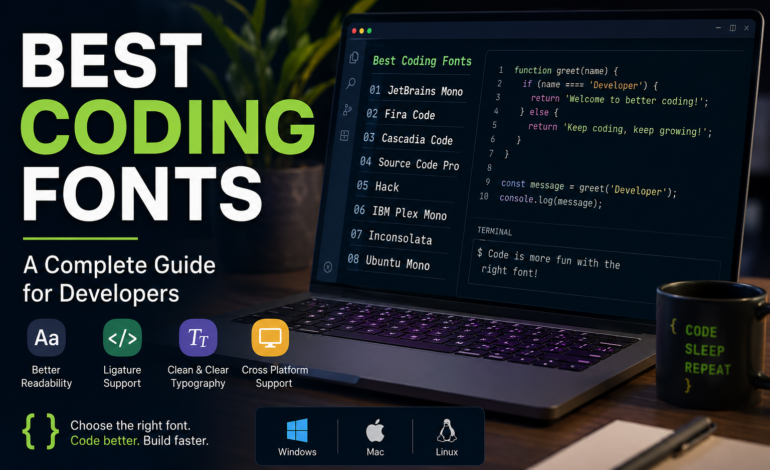
Every developer has a favorite code editor, keyboard, and workflow, but one detail often goes unnoticed—the font used to write code. The Best Coding Fonts can improve readability, reduce eye strain, and make long programming sessions more comfortable. Whether you’re building websites, creating mobile apps, or managing backend systems, choosing the right font can make a noticeable difference in your daily work.
This guide explains what makes a coding font great, highlights popular options, and helps you choose the right one for your operating system and development environment.
Why Your Coding Font Matters
Developers spend hours reading and writing code. A poorly designed font can make similar characters difficult to distinguish, increasing the chances of typing mistakes. A well-designed monospaced font keeps code clean, organized, and easy to scan.
Good coding fonts also improve concentration. Clear letter spacing and balanced character shapes reduce visual fatigue, allowing you to stay productive during extended coding sessions.
What Makes a Great Coding Font?
Before downloading a new font, consider the features that matter most.
Monospaced Characters
Every character occupies the same width, making code alignment consistent and improving readability.
Clear Character Distinction
Characters such as 0, O, 1, I, and l should be easy to tell apart. This is especially important when debugging or reviewing large codebases.
Comfortable Letter Spacing
Proper spacing prevents code from appearing crowded while making long files easier to read.
Ligature Support
Some developers enjoy fonts that combine programming symbols into cleaner visual representations. If that’s your preference, consider Best Coding Fonts with Ligatures that support operators without changing the actual code.
Best Coding Fonts for Developers
Professional developers often choose fonts designed specifically for programming rather than general reading. These fonts balance readability, spacing, and performance across different editors.
Some of the most trusted choices include:
- JetBrains Mono
- Fira Code
- Cascadia Code
- Source Code Pro
- Hack
- IBM Plex Mono
- Inconsolata
Each offers a slightly different style, so testing several options is worthwhile before deciding on one.
JetBrains Mono
JetBrains Mono has become one of the most popular programming fonts in recent years. Designed specifically for coding, it offers wide characters, excellent spacing, and optional ligatures.
It performs exceptionally well in modern IDEs and remains readable even at smaller font sizes, making it suitable for developers who spend long hours writing code.
Fira Code
Fira Code is another favorite among programmers. Its clean appearance and programming ligatures make complex operators easier to recognize.
Many developers appreciate its modern design, especially when working with JavaScript, TypeScript, Python, and Rust.
Cascadia Code
Created by Microsoft, Cascadia Code integrates seamlessly with Visual Studio and Visual Studio Code. The font provides crisp rendering, supports ligatures, and performs well on high-resolution displays.
It’s a reliable option for anyone working in the Microsoft development ecosystem.
Source Code Pro
Adobe designed Source Code Pro with readability in mind. The font has balanced spacing and a clean appearance that works well for both beginners and experienced developers.
Its simple design makes it suitable for almost every programming language.
Choosing the Best Coding Fonts for VS Code
Visual Studio Code is one of today’s most popular editors, so selecting the right font is important. The Best Coding Fonts for VS Code should remain clear in both dark and light themes while displaying symbols accurately.
Popular choices include:
- JetBrains Mono
- Cascadia Code
- Fira Code
- Source Code Pro
- Hack
All of these fonts work smoothly with VS Code’s customization features.
Best Coding Fonts for Programming
Different programming languages may not require different fonts, but your workflow certainly can. The Best Coding Fonts for Programming are those that help you read code quickly without creating unnecessary visual distractions.
If you regularly switch between multiple languages such as Python, JavaScript, Java, Go, or C++, fonts like JetBrains Mono and IBM Plex Mono provide consistent readability across projects.
Best Coding Fonts for Beginners
Learning to code involves recognizing syntax and understanding structure. The Best Coding Fonts for Beginners should clearly separate similar-looking characters while remaining comfortable to read.
Beginners often prefer:
- Cascadia Code
- JetBrains Mono
- Consolas
- Source Code Pro
These fonts make it easier to identify punctuation, brackets, and variables while reducing confusion.
Best Coding Fonts in 2026
As developer tools continue to evolve, font design is improving as well. The Best Coding Fonts in 2026 focus on accessibility, Unicode support, and better rendering across different displays.
Current favorites include JetBrains Mono, Fira Code, Cascadia Code, IBM Plex Mono, and Berkeley Mono. These fonts continue receiving updates and are trusted by developers worldwide.
Choosing Fonts for Different Operating Systems
Although most modern programming fonts work across platforms, some perform especially well on certain operating systems.
Best Coding Fonts for Windows
Windows users typically enjoy excellent compatibility with:
- Cascadia Code
- Consolas
- JetBrains Mono
- Source Code Pro
These fonts display sharply in Visual Studio, VS Code, and other Windows development tools.
Best Coding Fonts for Mac
Apple devices feature excellent font rendering. The Best Coding Fonts for Mac include SF Mono, JetBrains Mono, Menlo, and Fira Code.
These fonts look particularly sharp on Retina displays and integrate well with popular macOS editors.
Best Coding Fonts for Linux
Linux developers often prefer open-source fonts. The Best Coding Fonts for Linux include Hack, Ubuntu Mono, JetBrains Mono, and DejaVu Sans Mono.
These options provide excellent readability in terminals, editors, and IDEs across different Linux distributions.
Best Coding Fonts for Web Developers
Frontend developers frequently work with HTML, CSS, JavaScript, and frameworks like React or Vue. The Best Coding Fonts for Web Developers should display nested code structures clearly and remain comfortable during long editing sessions.
JetBrains Mono, Fira Code, and Source Code Pro are widely used because they handle indentation, symbols, and brackets exceptionally well.
Tips for Selecting the Right Coding Font
When choosing a font, keep these practical tips in mind:
- Test multiple fonts before deciding.
- Use a font size between 14 and 16 pixels for most displays.
- Enable ligatures only if they improve your reading experience.
- Pair your font with an editor theme that provides sufficient contrast.
- Adjust line height for improved readability.
- Choose comfort over trends.
The best font is the one that helps you write and review code efficiently.
Conclusion
Selecting the Best Coding Fonts is a simple change that can significantly improve your coding experience. A readable font reduces eye strain, improves code clarity, and helps maintain focus during long development sessions.
Whether you’re searching for fonts optimized for Visual Studio Code, macOS, Windows, Linux, or web development, there are excellent options available for every workflow. Try a few popular choices, customize your editor settings, and stick with the font that feels most comfortable. Small improvements in readability often lead to better productivity, making your coding sessions smoother and more enjoyable.