
Noob OS: Complete Raspberry Pi Guide for Beginners

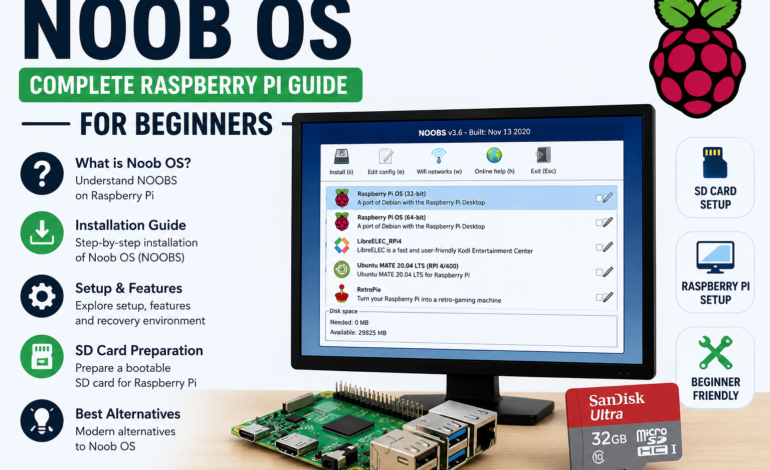
Searching for Noob OS can be confusing because the term is frequently used to describe Raspberry Pi’s older NOOBS software. NOOBS officially stood for “New Out Of Box Software” and was created to make the first Raspberry Pi installation easier. It provided a beginner-friendly environment for selecting and installing supported operating systems.
Although people often call it Noob OS, NOOBS was not actually a complete operating system. It functioned primarily as an installer and recovery environment that helped users prepare a Raspberry Pi. Understanding this distinction is important when reading older Raspberry Pi guides or searching for Noob OS installation information.
What Is Noob OS?
Noob OS is commonly used as an informal name for Raspberry Pi NOOBS. The software was designed to simplify operating system installation by giving beginners a straightforward interface for choosing an available system. This removed some of the complexity associated with manually writing operating-system images to an SD card.
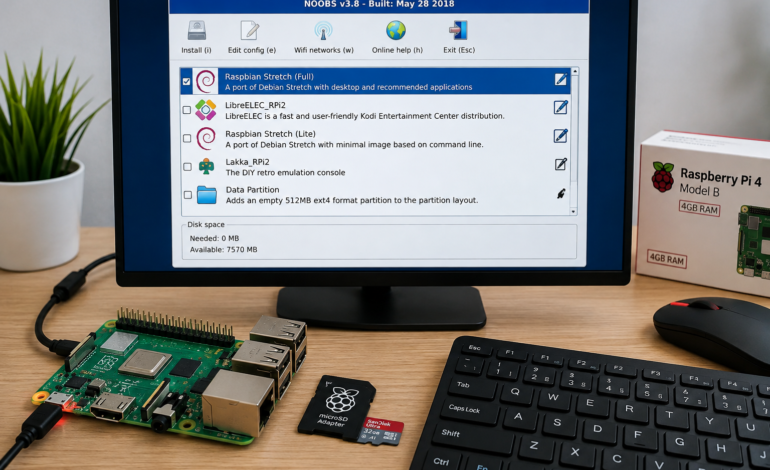
NOOBS could be placed on a prepared microSD card and launched when the Raspberry Pi started. Its interface then allowed users to select an operating system and begin installation. This approach made Raspberry Pi more approachable for people who had little experience with Linux or computer storage.
The important point is that NOOBS operating system is somewhat misleading terminology. NOOBS did not provide the complete desktop environment users normally associate with an operating system. Instead, it helped install systems that could later run the Raspberry Pi.
What Does Noob OS Mean?
When people search for what does Noob OS mean, they are usually referring to NOOBS rather than a separate operating system. NOOBS is an acronym for “New Out Of Box Software,” reflecting its original purpose of helping newcomers configure a Raspberry Pi.
The software was introduced specifically to make the first-time setup process less intimidating. Raspberry Pi explained that users could download the NOOBS archive, place it on a freshly formatted SD card, and select an operating system after booting the computer.
Therefore, the phrase Noob OS should generally be understood as a search variation connected with Raspberry Pi NOOBS. It does not mean that NOOBS itself was equivalent to Raspberry Pi OS or another complete Linux distribution.
Is Noob OS an Operating System?
The question is Noob OS an operating system has a straightforward answer: NOOBS was an installer rather than a full operating system. It provided the environment needed to select and install supported operating systems onto a Raspberry Pi storage device.
A complete operating system performs tasks such as managing hardware, running applications, controlling memory, handling files, and providing a user interface. NOOBS did not serve this role after installation because the selected operating system took over when the Raspberry Pi restarted.
This difference becomes particularly important when comparing Noob OS vs Raspberry Pi OS. Raspberry Pi OS is an actual operating system based on Debian Linux, while NOOBS was designed to help users install operating systems.
How Does Noob OS Work?
Understanding how does Noob OS work requires looking at its traditional installation workflow. Users first prepared an SD card, copied the NOOBS files onto it, and inserted the card into the Raspberry Pi. When the device booted, the NOOBS interface provided available operating-system choices.
The user could then select a preferred system and begin the installation. NOOBS handled the process of preparing the storage and installing the selected operating system, which reduced the need for manual image-writing procedures.
One of its useful characteristics was the recovery environment. Raspberry Pi’s original documentation explained that NOOBS could remain on the card and allow users to return to its recovery interface during boot.
Noob OS for Raspberry Pi
Noob OS for Raspberry Pi is most accurately understood as a reference to the historical NOOBS installer. It was developed specifically around the Raspberry Pi ecosystem and targeted users who wanted a simpler introduction to operating-system installation.
The software was especially attractive to beginners because it combined installation and recovery functionality in one interface. Users could select an operating system without immediately learning the technical details of disk imaging and bootable storage.
Historically, NOOBS could also provide access to multiple operating-system choices. Raspberry Pi’s documentation described its ability to install different systems and return users to a recovery interface when required.
Noob OS Installation
A traditional Noob OS installation started with preparing a compatible SD card. Users formatted the card, downloaded the NOOBS package, extracted the files, and copied the contents directly onto the storage device.
After the files were copied, the Raspberry Pi boot process could load the NOOBS installer. The interface displayed operating-system options that users could select according to their intended Raspberry Pi project.
Once an operating system was installed, the Raspberry Pi restarted into that system rather than continuing to operate inside NOOBS. This distinction demonstrates why NOOBS was an installation environment rather than the final operating system.
Noob OS Setup Step by Step
Step 1: Prepare the microSD Card
The first stage of a traditional Noob OS setup involved preparing a suitable microSD card. Important files should be backed up before formatting because the preparation process could remove existing information from the storage device.
The card needed enough available space for the NOOBS files and operating-system installation. Raspberry Pi’s historical guidance described using a freshly formatted SD card as part of the original NOOBS workflow.
Step 2: Copy the NOOBS Software
After preparing the storage, users downloaded the NOOBS package and extracted its contents. The extracted files then needed to be copied onto the microSD card while preserving their expected folder structure.
This stage was central to the traditional NOOBS installation guide because the Raspberry Pi needed to find the installer files during startup. Incorrectly copying or rearranging files could prevent the installation environment from loading correctly.
Step 3: Boot the Raspberry Pi
Once the storage card was prepared, users inserted it into the Raspberry Pi and connected the necessary peripherals. The device could then be powered on and allowed to start its boot sequence.
The Raspberry Pi installer would load the NOOBS interface if the card had been prepared correctly. Users could then review the available operating systems and choose the one they wanted to install.
Step 4: Install the Operating System
After selecting an operating system, NOOBS would prepare the storage and install the chosen system. The exact options available depended on the NOOBS release and the operating systems included or accessible through its installation environment.
Once installation finished, the Raspberry Pi could restart and load the selected system. From that point onward, users could access the Raspberry Pi desktop, install applications, and begin working on their projects.
Raspberry Pi Operating System and NOOBS
A Raspberry Pi operating system provides the software foundation that allows the hardware to function as a computer. It manages applications, storage, memory, networking, peripherals, and other system resources required for everyday use.
Raspberry Pi OS is the official operating system recommended for most Raspberry Pi use cases. It is based on Debian Linux and provides a complete environment for desktop computing, programming, education, and hardware projects.
NOOBS served a different purpose because it helped users install operating systems rather than replacing them. This is why the terms NOOBS software and Raspberry Pi OS should not be treated as interchangeable when discussing Raspberry Pi installation.
Noob OS vs Raspberry Pi OS
The difference between Noob OS vs Raspberry Pi OS is primarily about functionality. NOOBS was an installation and recovery environment, while Raspberry Pi OS is a complete Linux-based operating system designed for normal Raspberry Pi use.
Raspberry Pi OS includes a graphical desktop, system utilities, software packages, networking capabilities, and development tools. Users can work with files, applications, programming environments, and other features after the operating system has been installed.
NOOBS, meanwhile, was used before the main operating system became the active environment. Once the selected operating system was installed, the Raspberry Pi would boot into that system for regular use.
Noob OS vs NOOBS
The phrases Noob OS and NOOBS can create confusion because they look like references to different products. In most Raspberry Pi searches, “Noob OS” is being used informally to refer to NOOBS, the New Out Of Box Software installer.
NOOBS was the official name used by Raspberry Pi when the software was introduced. Official Raspberry Pi material describes NOOBS as software intended to make first-time Raspberry Pi setup easier for beginners.
For SEO content, it is useful to include both terms naturally while clearly explaining the terminology. This helps readers understand that “Noob OS” is generally a search variation rather than the formal name of a separate operating system.
Noob OS Recovery Environment
One notable feature of NOOBS was its recovery environment. After installing an operating system, users could return to the NOOBS interface during boot and access recovery-related options.
According to Raspberry Pi’s original description, the recovery interface could allow users to switch operating systems or overwrite a corrupted installation. It also included configuration-related functionality that could help users manage their installed system.
This recovery capability made NOOBS more than a one-time installer. It remained useful for managing certain legacy multi-system configurations and gave beginners an accessible way to recover from some installation problems.
Raspberry Pi SD Card Setup
A reliable Raspberry Pi SD card setup was essential for traditional NOOBS installation. The microSD card acted as the main storage medium, containing the installer files and eventually the selected operating system.
Users needed to format the card correctly before copying the NOOBS package. Raspberry Pi’s historical installation instructions specifically described formatting a microSD card and copying the NOOBS software onto it before booting the Raspberry Pi.
Because storage preparation could erase existing files, backing up important information was an important precaution. A properly prepared card also reduced the likelihood of boot and installation errors.
Raspberry Pi Software for Beginners
After installing an operating system, beginners can explore a broad range of Raspberry Pi software. Programming environments, web browsers, educational applications, text editors, media tools, and system utilities can all expand the capabilities of the computer.
The Linux foundation of Raspberry Pi OS provides access to a substantial software ecosystem. This allows beginners to start with simple applications and gradually explore more advanced areas such as programming, networking, automation, and server management.
The Raspberry Pi therefore works as both a compact computer and a learning platform. Its software ecosystem can support practical projects that introduce users to concepts far beyond basic desktop computing.
Is Noob OS Still Supported?
The question is Noob OS still supported requires an important distinction between historical availability and current recommendation. Raspberry Pi no longer recommends NOOBS for new installations, and modern Raspberry Pi OS installation uses Raspberry Pi Imager.
Raspberry Pi introduced its Imager utility as a simpler method for writing Raspberry Pi OS and other operating systems to microSD cards. The tool was designed to reduce the complexity involved in finding and writing current operating-system images.
Therefore, users starting a new Raspberry Pi project should generally choose the current imaging workflow. NOOBS remains mainly relevant when researching older systems, maintaining legacy projects, or understanding historical Raspberry Pi installation methods.
Best Alternative to Noob OS
For modern Raspberry Pi installations, Raspberry Pi Imager is the most appropriate alternative to the historical NOOBS workflow. It provides a centralized interface for selecting an operating system and writing it to compatible storage.
The current Raspberry Pi documentation states that Raspberry Pi OS is installed using Raspberry Pi Imager. This reflects the modern installation process and avoids relying on an outdated installer.
Imager also reduces the manual steps that were previously associated with NOOBS. Instead of downloading an installer archive, extracting files, and copying them to an SD card, users can select the operating system and storage through the imaging application.
Noob OS for Older Raspberry Pi Models
Noob OS for older Raspberry Pi models can still be relevant when maintaining an existing project. Some older systems may have been configured using NOOBS, and understanding its installation structure can make troubleshooting or restoration easier.
In these situations, users should identify the Raspberry Pi model, existing operating-system version, and original installation method before changing anything. This information can help preserve compatibility with an older project.
For a completely new installation, however, using current Raspberry Pi software is generally preferable. Legacy tools should be considered according to the project’s specific requirements rather than used simply because an old tutorial recommends them.
Frequently Asked Questions
What Is Noob OS?
Noob OS is commonly used as an informal reference to Raspberry Pi NOOBS. NOOBS stands for “New Out Of Box Software” and was created to simplify operating-system installation for Raspberry Pi beginners.
It was not a complete operating system itself. Instead, it provided an installer and recovery environment through which users could select and install supported Raspberry Pi operating systems.
How to Install Noob OS on Raspberry Pi?
The historical installation involved formatting a microSD card, downloading the NOOBS package, extracting its contents, and copying the files onto the card. The card was then inserted into the Raspberry Pi and used to boot the NOOBS interface.
From there, users selected an available operating system and started the installation. For modern Raspberry Pi systems, however, Raspberry Pi Imager is the recommended installation approach.
Is Noob OS the Same as Raspberry Pi OS?
No, they are not the same. NOOBS was an installer and recovery environment, whereas Raspberry Pi OS is a complete Linux-based operating system for Raspberry Pi computers.
NOOBS could help users install Raspberry Pi OS, but Raspberry Pi OS was the environment used for normal computing after installation.
How to Download Noob OS for Raspberry Pi?
The phrase Noob OS download usually refers to historical NOOBS packages. Because NOOBS is no longer the recommended installation method, users should first determine whether their project specifically requires the legacy software.
For current Raspberry Pi installations, the better approach is to use Raspberry Pi Imager and select the required operating system through the modern imaging workflow.
Final Thoughts
Noob OS is primarily a search-friendly term associated with Raspberry Pi NOOBS, an installer designed to make operating-system installation easier for beginners. It played an important role in the early Raspberry Pi ecosystem by simplifying SD card preparation, operating-system selection, and recovery.
However, NOOBS should not be confused with a complete operating system. Raspberry Pi OS provides the actual Linux-based computing environment, while NOOBS historically helped users install and manage supported systems.
For older Raspberry Pi projects, understanding Noob OS installation, the NOOBS installer, and the NOOBS recovery environment can still be valuable. For new installations, Raspberry Pi Imager is the modern approach recommended by Raspberry Pi.










1 Comment
[…] for beginners, hobbyists, and educators to experiment with Linux. Central to this approach was the NOOBS Operating System—an acronym for “New Out Of Box Software.” Designed as an intuitive graphical OS […]
Comments are closed.