Graphic Designing: The Ultimate Guide to Master Principles and Software

In today’s digital-first world, visual communication is the heartbeat of every successful brand, website, and marketing campaign. Whether you are looking to break into the industry as a freelance graphic designer, scale your business using creative graphic design, or simply understand the core fundamentals of visual design, this comprehensive guide covers everything you need to know about professional graphic designing.
Table of Contents
- What is Graphic Designing and How Does It Work?
- Core Principles of Graphic Design and Visual Communication
- Essential Elements: Typography, Color Theory, and Layout
- Specialized Areas in Graphic Designing
- Top Graphic Design Tools and Software
- How to Learn Graphic Designing for Beginners
- Graphic Design Career Paths and Finding Graphic Design Jobs
- How Graphic Design Helps Businesses Grow
- Frequently Asked Questions (FAQs)
What is Graphic Designing and How Does It Work?
At its core, graphic designing is the art and practice of planning and projecting ideas and experiences with visual and textual content. The form of the communication can be physical or digital, and may include images, words, or graphics.
When people ask, “what is graphic designing and how does it work?”, the answer lies in problem-solving. A graphic designer acts as a visual communicator who takes a complex message, brand identity, or marketing goal and translates it into an intuitive, visually arresting format. To explore professional industry standards and design certifications, you can visit Adobe’s Official Creativity Hub.
The Creative Graphic Designing Process
- The Brief & Research: Understanding the target audience, brand values, and project objectives.
- Ideation & Sketching: Brainstorming concepts and drawing rough layouts on paper or digital tablets.
- Digital Execution: Using design software like Adobe Illustrator or Canva graphic design platforms to bring concepts to life.
- Refinement & Feedback: Tweaking colors, typography, and alignments based on client or stakeholder input.
- Final Delivery: Exporting files in appropriate formats for print or digital media.
Core Principles of Graphic Design and Visual Communication
Great modern graphic design isn’t just about making things look pretty; it relies on time-tested design principles to guide the viewer’s eye and convey a clear message through expert graphic designing.
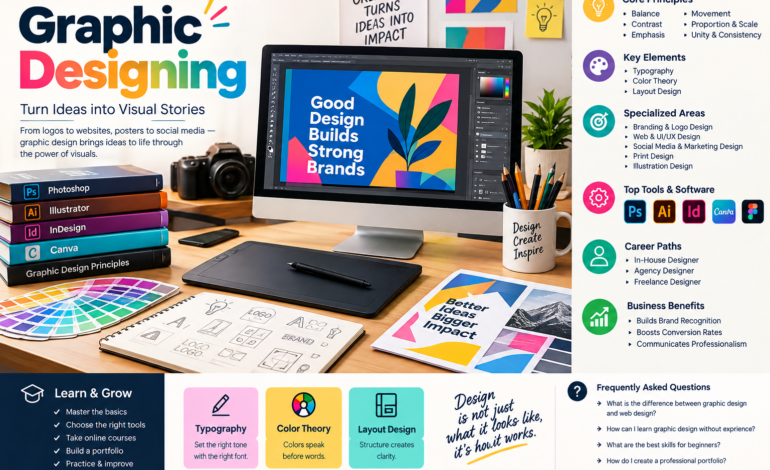
- Balance: Distributing visual weight evenly across a layout (symmetrical or asymmetrical).
- Contrast: Using opposing elements—such as light and dark colors, thick and thin lines, or large and small fonts—to create focus.
- Emphasis: Making a specific element (like a call-to-action button or headline) stand out.
- Movement: Directing the viewer’s eye across the design in a deliberate path.
- Proportion and Scale: Creating a visual hierarchy by sizing elements relative to their importance.
- Unity and Consistency: Ensuring all components of a design work harmoniously together.
For a deeper dive into structural styling, check out our guide on Web Design vs UI/UX Design Fundamentals.
Essential Elements: Typography, Color Theory, and Layout
To master creative graphic design through professional graphic designing, you must understand the foundational building blocks of visual communication.
1. Typography and Text Hierarchy
Typography is much more than choosing a nice font; it is the art of arranging type to make written language legible, readable, and visually appealing.
- Serif vs. Sans-Serif: Serif fonts (like Times New Roman) offer a traditional, formal look, while sans-serif fonts (like Helvetica or Roboto) feel modern and clean.
- Hierarchy: Combining font weights, sizes, and styles to guide readers from headlines to subheadings and body copy.
2. Color Theory in Graphic Design
Colors evoke emotions and drive consumer behavior. A strategic branding design relies heavily on color psychology:
- Red: Energy, passion, urgency (often used in food and clearance sales).
- Blue: Trust, security, professionalism (popular in tech and corporate finance).
- Green: Growth, health, sustainability (ideal for eco-friendly or wellness brands).
- Contrast & Harmony: Using complementary or analogous color palettes to ensure visual clarity.
3. Layout Design & Composition
Layout design dictates how elements are arranged on a canvas. Utilizing grids, whitespace (negative space), and alignment ensures that your marketing design and print design pieces never feel cluttered.
Specialized Areas in Graphic Designing
The graphic designing industry is vast, offering numerous specializations depending on your interests and career goals.
- Branding Design & Logo Creation: Crafting brand identities, style guides, and memorable logos that represent a company’s core values.
- Web Design & UI/UX Design: Creating intuitive user interfaces (UI) and seamless user experiences (UX) for websites and mobile applications.
- Social Media & Marketing Design: Designing eye-catching banners, carousels, and ad creatives tailored for digital marketing campaigns.
- Print Design: Designing physical collateral such as business cards, brochures, packaging, billboards, and magazines.
- Illustration Design: Producing custom digital artwork, vector graphics, and icons to elevate visual storytelling.
Top Graphic Design Tools and Software
Having the right toolkit is essential whether you are pursuing a full-time career or looking for graphic design for beginners tutorials. To learn more about industry standards, check out resources on Interaction Design Foundation.
Professional Software for Graphic Designing
- Adobe Photoshop: The industry gold standard for photo manipulation, digital painting, and raster-based graphics.
- Adobe Illustrator: Essential for vector graphics, logo design, typography creation, and scalable icons.
- InDesign: The go-to tool for multi-page layouts like magazines, ebooks, and annual reports.
Accessible & Collaborative Platforms
- Canva Graphic Design: Perfect for entrepreneurs and marketers seeking drag-and-drop simplicity, pre-made templates, and rapid content generation.
- Figma: The leading tool for collaborative UI design and web prototyping.
How to Learn Graphic Designing for Beginners
Starting your journey doesn’t require an expensive art degree. With dedication and the right approach, anyone can learn graphic design for beginners and master the core rules of graphic designing.
Step-by-Step Learning Path
- Master the Basics: Study fundamental graphic design principles and elements of art.
- Choose Your Tools: Download a beginner-friendly tool or professional trial software to practice daily.
- Enroll in Online Education: Look for the best graphic design courses online via trusted platforms.
- Build a Portfolio Early: Don’t wait until you feel “ready.” Create speculative rebranding projects, posters, and social media templates to build your graphic design portfolio.
- Practice Emulation: Recreate designs you admire to understand how professional designers balance color, typography, and spacing.
Graphic Design Career Paths and Finding Graphic Design Jobs
As businesses increasingly shift online, the demand for skilled professionals continues to surge. Understanding the graphic design career landscape can help you position yourself for long-term success.
Popular Graphic Designing Opportunities
- In-House Graphic Designer: Working exclusively as part of a company’s marketing or creative team.
- Agency Designer: Collaborating with diverse clients across multiple industries on fast-paced campaigns.
- Freelance Graphic Designer: Operating independently, managing your own clients, pricing, and projects.
How to Land Graphic Design Jobs
To secure lucrative graphic design jobs or find high-paying gigs on freelance platforms, you need:
- A polished, case-study-driven graphic design portfolio.
- Proficiency in both traditional and modern graphic design software.
- Strong communication skills to pitch your creative ideas to clients and stakeholders.
How Graphic Design Helps Businesses Grow
Many business owners wonder if investing in professional business graphic design is truly worth it. The answer is a definitive yes.
- Builds Brand Recognition: Consistent visuals across your website, social media, and packaging make your brand instantly recognizable.
- Boosts Conversion Rates: Clean graphic design for marketing materials and landing pages guides user attention directly to purchase or sign-up buttons.
- Communicates Professionalism: High-quality design builds immediate trust and credibility with prospective customers.
Frequently Asked Questions (FAQs)
What is the difference between graphic design and web design?
While graphic design focuses broadly on visual communication across both print and digital mediums (logos, packaging, social media), web design specifically centers on structuring, styling, and optimizing websites and user interfaces (UI/UX) for the internet.
How can I learn graphic design without experience?
You can start completely from scratch by studying free online tutorials, mastering beginner tools like Canva or Figma, practicing fundamental design principles daily, and building a starter portfolio with personal or concept projects.
What are the best graphic design skills needed for beginners?
Key foundational skills include understanding color theory, mastering typography hierarchy, learning basic layout composition, and gaining proficiency in at least one major design software tool.
How do I create a professional graphic design portfolio?
A strong portfolio should showcase 4 to 6 of your best projects. Include a brief description of the problem solved, your creative process, and the final visual assets rather than just displaying isolated images.