How to Download YouTube Shorts Videos Online: The Complete 2026 Guide

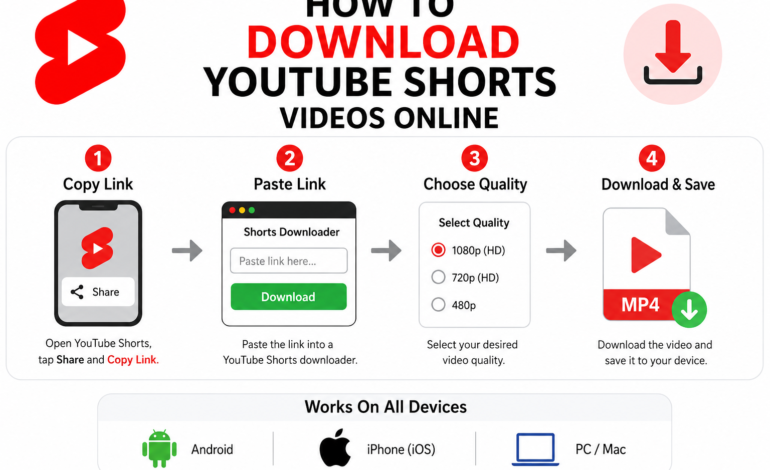
Want to download YouTube Shorts videos in HD quality to your phone or desktop without installing any software? YouTube Shorts has become one of the most popular short-form video platforms, but saving these clips directly to your camera roll or gallery requires a fast and reliable tool. In this guide, you will learn the step-by-step process to download YouTube Shorts safely and easily across Android, iPhone, and PC.
If you want to download YouTube Shorts for offline viewing, edit clips for personal projects, or save high-definition content to your phone gallery, using a YouTube Shorts downloader online is the most reliable method.
This step-by-step guide covers how to save YouTube Shorts videos in HD quality across Android, iPhone, and PC—completely free and without installing extra software.
1. What is a YouTube Shorts Downloader?
A YouTube Shorts downloader is a specialized online utility that extracts short-form video files directly from YouTube’s servers using a URL link. It converts the stream into a standalone digital media file—most commonly high-definition MP4—so you can save YouTube Shorts directly to your device storage.
[ Copy Shorts Link ] ──► [ Paste into Downloader Tool ] ──► [ Select HD Resolution ] ──► [ Save MP4 File ]
While YouTube offers an in-app offline download feature for YouTube Premium subscribers, these files remain locked inside the application and cannot be transferred, shared, or viewed with third-party media players. An online Shorts downloader overcomes these restrictions by providing direct access to the raw media file.
2. Key Features of an Ideal Shorts Downloader Tool
When selecting a YouTube Shorts saver, look for platforms that offer speed, high resolution, and strong data privacy.
| Feature | Best Standard | Why It Matters |
| Video Quality | 1080p / 720p HD | Ensures crisp visuals on retina screens and desktop displays. |
| Output Format | Universal MP4 | Guaranteeing universal playback across iOS, Android, and PC. |
| Watermark Removal | 100% Clean File | Downloads raw video without overlay logos or added branding. |
| Cross-Platform | Web-based (No App) | Works directly in Safari, Chrome, Edge, and Firefox. |
| Speed & Safety | Instant Extraction | No account registration, hidden subscriptions, or pop-up bloatware. |
3. How to Download YouTube Shorts Videos on Android
Android users have the most flexible ecosystem for downloading online media. You can quickly download YouTube Shorts to phone gallery using any modern web browser without downloading third-party APKs.
[ Open YouTube App ] ──► [ Tap Share -> Copy Link ] ──► [ Open Browser ] ──► [ Paste & Download MP4 ]
Step-by-Step Instructions:
- Open the YouTube application on your Android device and locate the Short you want to store.
- Tap the Share arrow icon on the bottom right of the player screen.
- Select Copy Link to save the URL to your clipboard.
- Launch Google Chrome, Brave, or your preferred mobile browser.
- Visit a free YouTube Shorts downloader website.
- Paste the link into the designated input box and tap Download.
- Choose your desired output resolution (e.g., 1080p HD) to initiate the process and save Shorts to device.
Once finished, the video will appear instantly inside your Google Photos app or native Downloads folder.
4. How to Download YouTube Shorts Videos on iPhone (iOS)
Due to iOS security protocols, many users struggle when trying to download YouTube Shorts on iPhone. However, using modern Safari capabilities, the process is simple and requires no jailbreaking or external software.
Step-by-Step Instructions:
- Launch the YouTube app on your iPhone and navigate to the desired Short clip.
- Tap the Share button and select Copy Link.
- Open Safari (ensure you are using Safari for native file-saving features).
- Go to a trusted YouTube Shorts download website.
- Paste the link into the conversion bar and tap the search icon.
- Select YouTube Shorts MP4 download in 1080p resolution.
- Tap the Safari download pop-up confirmation.
- Once complete, tap the blue download arrow in the Safari address bar, open the file, tap Share, and select Save Video to move it directly to your iOS Camera Roll.
5. How to Download YouTube Shorts to PC / Mac
If you are a video editor or content creator looking to download YouTube Shorts to PC, desktop browsers offer the fastest processing speeds and highest resolution options.
┌───────────────────────────────────────────────────────────┐
│                    DESKTOP DOWNLOAD STEPS                 │
├───────────────────────────────────────────────────────────┤
│ 1. Open browser and navigate to youtube.com/shorts        │
│ 2. Copy the URL directly from the browser address bar     │
│ 3. Open online YouTube Shorts downloader tool              │
│ 4. Paste link, select 1080p resolution, click Download    │
└───────────────────────────────────────────────────────────┘
Why Download on Desktop?
- Batch Processing: Easily handle multiple files for video curation projects.
- Higher Resolution Standards: Consistently grab uncompressed YouTube Shorts 1080p download files.
- Direct NLE Import: Save files directly into project folders for Adobe Premiere, Final Cut Pro, or DaVinci Resolve.
6. How to Download YouTube Shorts Without Watermark
Content creators often wonder how to download YouTube Shorts without watermark online. Unlike platforms like TikTok, YouTube does not burn a bouncing watermark logo directly into the video stream during standard web streaming.
When you use a YouTube Shorts URL downloader, the tool extracts the clean video stream directly from YouTube’s host server. This guarantees that your download YouTube short video online process yields a clean file suitable for personal archives or cross-platform media production.
7. Legal & Fair Use Guidelines for Downloading Shorts
While using a YouTube Shorts link downloader is simple, you must respect intellectual property rights and platform regulations:
Important Notice: Always seek permission from the original content owner before re-uploading, monetizing, or publicly distributing downloaded media.
- Personal Offline Viewing: Saving videos to watch offline while traveling or in low-connectivity zones falls under personal media consumption.
- Fair Use & Commentary: Content creators using short snippets for commentary, educational reviews, or critique must comply with international Fair Use guidelines.
- Copyright Restrictions: Commercial distribution or claiming ownership over another creator’s work is strict copyright infringement.
Frequently Asked Questions (FAQ)
Is it safe to use an online YouTube Shorts downloader tool?
Yes, using a web-based YouTube Shorts download tool is safe as long as you use a reputable web service that does not require installing executable executable (.exe) files or granting unnecessary device permissions.
Can I download YouTube Shorts as MP4 on any browser?
Yes, YouTube Shorts MP4 downloader tools work across all modern browsers including Google Chrome, Apple Safari, Mozilla Firefox, Microsoft Edge, and Opera.
Is there a limit on how many short videos I can download?
Most free online YouTube Shorts video downloader platforms offer unlimited daily downloads without imposing usage caps or requiring paid user accounts.
Why won’t my downloaded Short play audio?
If a video downloads without sound, ensure you selected an audio-enabled MP4 output stream rather than a silent video-only track (M4A/DASH streams).