YouTube Short Downloader: A Complete Guide to Saving and Managing YouTube Shorts

YouTube Shorts have become one of the most popular forms of short-form video content on the internet. Their quick format, vertical presentation, and wide range of topics make them easy to watch and share. From educational tips and technology tutorials to entertainment, recipes, fitness ideas, and creative content, Shorts provide information in a format that can be consumed within seconds.
As the popularity of Shorts continues to grow, many people search for a YouTube Short Downloader when they want to save a video for later viewing. A downloader can be useful when a creator has provided permission to save their content, when a video is available for legitimate offline access, or when someone wants to keep their own uploaded Shorts for backup purposes.
However, downloading online videos involves more than simply copying a video address and pressing a download button. Copyright, creator permissions, platform rules, privacy, file formats, video quality, and device compatibility can all affect how a downloaded video should be used.
This comprehensive guide explains what a YouTube Short Downloader is, how these tools generally work, what features users should consider, how to download Shorts responsibly, and what common mistakes should be avoided.
What Is a YouTube Short Downloader?
A YouTube Short Downloader is a web-based service, application, or software tool designed to help users save eligible YouTube Shorts as video files. Depending on the service, users may be able to select different video qualities or formats before saving a file to their device.
YouTube Shorts are short-form vertical videos designed primarily for mobile viewing. Because they are often brief and visually engaging, users may want to save videos for personal reference, offline viewing where permitted, educational use with appropriate permission, or backup purposes.
A typical downloader works by processing the URL of a publicly accessible Short and identifying the available media information. The service may then provide an option to save the resulting file in a supported format.
It is important to understand that a downloader does not automatically give a person ownership of the content. The original creator may retain copyright over the video, music, images, narration, graphics, and other elements included in it. Therefore, saving a video and having permission to reuse it are two different things.
How Does a YouTube Short Downloader Work?
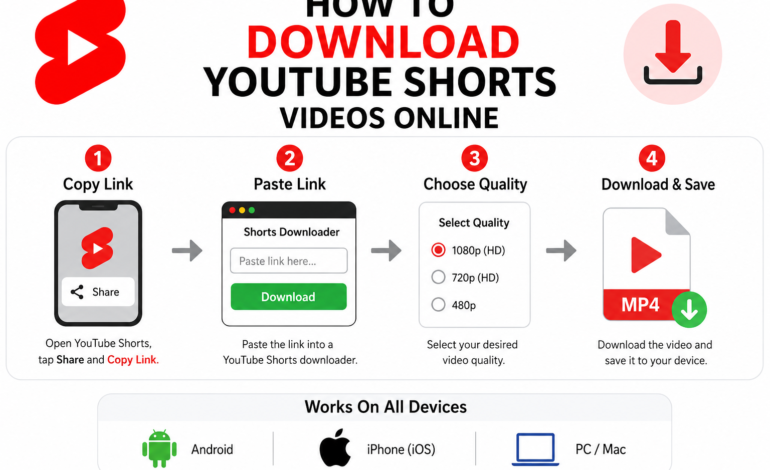
Although different services use different technical systems, the basic process is generally straightforward. A user first identifies a Short that can legally be saved and copies its URL. The URL is then entered into a compatible downloader.
The service processes the address and attempts to identify the publicly available media information associated with it. If the content is supported, the downloader may display available options such as video quality or file format.
After selecting an appropriate option, the user can save the resulting file to a compatible device.
A simplified workflow looks like this:
| Step | What Happens |
|---|---|
| 1. Find a Short | Locate the video you want to save |
| 2. Copy the URL | Use the sharing or copy-link option |
| 3. Open a compatible tool | Use a reputable downloader that supports the content |
| 4. Paste the URL | Insert the video address into the provided field |
| 5. Select an option | Choose an available format or quality |
| 6. Save the file | Download the eligible video to your device |
| 7. Use responsibly | Follow copyright, privacy, and platform rules |
The actual process can vary between services, browsers, operating systems, and device types.
Why Do People Use YouTube Short Downloaders?
There are several legitimate reasons someone may want to save a Short. One common reason is offline reference. For example, a person may want to keep their own educational Short available for reviewing content when internet access is unavailable.
Creators may also save copies of their own videos as backups. Maintaining original copies of published content can be useful if the source file is accidentally deleted or becomes difficult to access later.
Another use case involves research and personal organization. Someone studying a topic may want to retain a permitted copy of a video for personal reference. In educational or professional environments, however, permission and licensing should always be considered before redistributing or republishing downloaded content.
The key distinction is between saving content for an authorized purpose and downloading someone else’s copyrighted material for unauthorized redistribution.
YouTube Shorts Downloading and Copyright
Copyright is one of the most important considerations when saving online videos.
A video uploaded to YouTube can contain multiple copyrighted elements. These may include the video itself, background music, photographs, animation, logos, voice recordings, and other creative material. Downloading a copy does not normally transfer ownership of these rights.
For this reason, users should consider the intended use before saving or sharing a Short.
Personal access and authorized use can be very different from uploading the same video to another platform, using it in commercial advertising, removing the creator’s branding, or presenting it as original work.
If a creator explicitly provides permission for downloading and reuse, that permission should be respected according to its terms. Similarly, content released under an appropriate license may have specific requirements for attribution or modification.
When there is uncertainty about whether a video can legally be reused, checking the creator’s stated permissions and the applicable copyright rules is a safer approach.
Can You Download Any YouTube Short?
Not necessarily.
The availability of a Short through a third-party downloader does not mean that the video is automatically free to download, copy, modify, or redistribute. Technical accessibility and legal permission are separate issues.
Some videos may be protected by copyright, contain licensed music, or be subject to restrictions that make downloading or redistribution inappropriate.
Private videos and restricted content should not be treated like publicly available content. Users should also avoid tools that attempt to bypass account security, access controls, or other technical protections.
The safest approach is to download content only when there is a legitimate reason and the intended use is permitted.
YouTube Short Downloader Features to Look For
Not all downloader tools provide the same experience. If someone needs a tool for permitted content, several characteristics can help determine whether the service is useful and trustworthy.
Simple User Interface
A good downloader should have an understandable interface. Users should be able to identify where to enter the video URL without dealing with confusing instructions or unnecessary steps.
A clean interface also reduces the possibility of accidentally selecting misleading advertisements or unrelated buttons.
Multiple Video Qualities
Some services may offer several quality options. Depending on the source, available resolutions can vary.
Higher resolution generally produces a clearer image but can also result in a larger file. Lower resolutions may require less storage and bandwidth.
For a short video viewed on a mobile screen, extremely high resolution may not always provide a meaningful benefit.
Common File Formats
Compatibility is another important factor. A downloaded video should work with the intended device or media player.
MP4 is widely supported across modern computers, smartphones, tablets, and many video editing applications. However, the available format depends on the downloader and the source media.
Mobile Compatibility
Because Shorts are heavily associated with mobile viewing, a useful downloader should provide a reasonable experience on smartphones and tablets.
A responsive website should fit smaller screens, provide readable controls, and avoid unnecessary interface elements that make the process difficult.
Reasonable Processing Speed
Processing time can depend on video length, source availability, server performance, internet speed, and selected quality.
A trustworthy service should provide clear feedback rather than leaving users wondering whether a request is still processing.
Privacy Considerations
Privacy should be considered before using any online downloader.
A user should be cautious if a service requests unnecessary personal information, account credentials, payment information, or unrelated permissions simply to process a public video URL.
Avoid entering YouTube passwords or other sensitive credentials into third-party downloading websites.
How to Choose a Safe YouTube Short Downloader
Searching for a downloader can produce many websites, but not every result deserves trust.
A responsible selection process should focus on transparency, security, usability, and privacy.
First, examine the website carefully. Excessive pop-ups, deceptive download buttons, suspicious redirects, and aggressive requests for browser permissions can be warning signs.
Second, avoid services that ask for unnecessary sensitive information. A simple URL-processing service generally should not require a user’s social media password.
Third, be careful with downloadable applications. If software is required, it should come from a trustworthy source. Unknown executable files can introduce unnecessary security risks.
Finally, users should keep their browser and operating system updated. Security is not only the responsibility of the website; the device itself should also have appropriate protections.
How to Download a YouTube Short Responsibly
The responsible process begins before the download itself.
First, identify the Short you want to save and determine whether you have a legitimate reason to download it. If the video belongs to another creator, check whether the creator has provided permission or an appropriate license for downloading and reuse.
Next, copy the video’s URL using the normal sharing features available on the platform.
Open a reputable service that supports the permitted content and enter the URL. Review the available options and select an appropriate format and quality.
After saving the file, keep it for the purpose for which it was authorized. If the content requires attribution, retain the creator information and follow the applicable license terms.
Avoid uploading the downloaded video to another platform simply because the file is available on your device.
YouTube Short Downloader on Mobile Devices
Mobile users often want a quick way to save short-form videos because Shorts are primarily consumed on smartphones.
A browser-based tool can sometimes be convenient because it does not require a separate application. Users can open a compatible website, provide an eligible video URL, select an available option, and save the file if permitted.
On Android devices, downloaded files may appear in the browser’s download location or a designated downloads folder. On iPhone and iPad devices, file handling can depend on the browser and the selected storage location.
Storage should also be considered. Although Shorts are usually brief, repeatedly saving high-resolution videos can consume significant space over time.
Downloading YouTube Shorts on a Computer
Desktop and laptop users have additional options for managing downloaded media. A browser-based service can work across many operating systems without requiring dedicated software.
After obtaining an authorized video file, users can organize it into folders based on topic, project, creator, or date.
For content creators, maintaining an organized archive can be particularly useful. Original video files, edited versions, thumbnails, captions, and published copies can be stored separately to simplify future content management.
However, downloaded videos belonging to other creators should not be added to commercial content libraries unless the appropriate rights have been obtained.
Video Quality: Which Resolution Should You Choose?
Video quality affects both appearance and storage requirements.
A higher-resolution file generally contains more visual information and may look better on large displays. However, higher quality also tends to increase file size.
For basic personal reference, a moderate resolution may be sufficient. For authorized editing or production work, the highest available source quality may be more appropriate, provided the user has the necessary rights.
The best choice depends on the purpose of the file rather than simply selecting the largest available number.
| Use Case | Suitable Consideration |
|---|---|
| Mobile viewing | Moderate resolution may be sufficient |
| Offline reference | Balance quality and storage |
| Large display | Higher resolution may be preferable |
| Editing | Use the highest authorized source quality |
| Archiving | Preserve the best legitimate source available |
MP4 and Other Video Formats
File format determines how a video is stored and how easily it can be opened by different applications.
MP4 is one of the most widely supported video containers and is commonly compatible with smartphones, computers, browsers, televisions, and editing software.
Other formats may provide different technical characteristics, but compatibility should always be checked before selecting a format.
For most general purposes, compatibility is more important than choosing a technically complex format that may require specialized software.
YouTube Short Downloader vs Screen Recording
Screen recording and downloading are two different ways of preserving video content, but they also have different practical limitations.
A downloader may preserve the original available media file more directly, while screen recording captures what appears on the screen. Screen recordings can potentially include interface elements, notifications, or changes in playback quality.
Neither method automatically grants permission to redistribute copyrighted content.
If a platform or creator provides an official offline viewing option, that may be preferable to using an external method because it operates within the platform’s intended functionality.
Official Offline Viewing vs Third-Party Downloading
Users sometimes confuse offline viewing with obtaining a permanent video file.
An official offline feature, when available, is generally designed to let users access content through the platform under its applicable terms. A third-party downloader, on the other hand, may create a separate media file.
These approaches can have different technical and legal implications.
For ordinary viewing, an official offline feature can be the simplest choice. A separate file may be useful when the user owns the content or has explicit permission to save it as a file.
Understanding this distinction helps users select the appropriate method for their actual purpose.
Common Problems With YouTube Short Downloaders
Downloader services can sometimes fail for technical reasons.
Invalid URL
A copied URL may be incomplete, incorrectly formatted, or no longer available. Checking the address and copying it again can resolve basic problems.
Video Is Unavailable
A Short may have been deleted, made private, restricted, or otherwise changed since the URL was copied.
In such cases, a downloader may not be able to process it.
Processing Takes Too Long
Processing speed can depend on server load, network conditions, and the source video’s availability. Repeatedly refreshing a page may not solve the underlying problem.
Download Button Does Not Work
Some websites use multiple buttons, including advertisements that look similar to actual controls. Users should carefully inspect the page before clicking.
Poor Video Quality
The downloaded quality can depend on the source and the processing method. Selecting a higher available resolution may help when that option legitimately exists.
Security Risks to Avoid
One of the biggest concerns with free online downloading websites is security.
Some websites may display misleading advertisements or attempt to redirect visitors to unrelated pages. Others may encourage users to install browser extensions or applications that are not necessary for the requested task.
Users should be particularly cautious about:
- Websites requesting passwords
- Unexpected executable downloads
- Suspicious browser extensions
- Fake download buttons
- Excessive pop-ups
- Requests for unnecessary permissions
- Pages claiming that security software must be disabled
- Services requesting sensitive personal information
A downloader should never require users to compromise the security of their device just to save an eligible video.
Can Downloaded Shorts Be Shared on Social Media?
Downloading a Short and sharing it publicly are separate actions.
If the original creator owns the copyright, reposting their video without permission can create copyright problems. Adding a watermark, changing the video’s size, cropping it, or adding background music does not automatically make the content original.
For legitimate reuse, users should obtain appropriate permission or rely on content that is clearly licensed for redistribution.
Creators who want others to share their work can make their reuse conditions clear in descriptions, licensing information, or other published guidelines.
Can Downloaded Shorts Be Used for Commercial Purposes?
Commercial use requires additional caution.
Using someone else’s Short in an advertisement, promotional campaign, monetized video, product page, or business social media account can involve copyright and licensing considerations.
Even if a video is publicly available, that does not necessarily mean it can be used for commercial purposes.
Businesses should verify that they have the necessary rights for video footage, music, graphics, trademarks, and other elements included in the content.
When commercial usage is important, obtaining written permission or using appropriately licensed media is a safer approach.
YouTube Short Downloader for Content Creators
Content creators can have legitimate reasons for downloading Shorts, particularly when managing their own content.
A creator may want to keep backup copies of published videos, move their own content between devices, or archive previous versions.
However, the best archival practice is to preserve the original project files whenever possible. A downloaded version from a social platform may have different technical characteristics from the original production file.
For long-term content management, creators should maintain organized backups containing original footage, edited projects, final exports, thumbnails, captions, and other important assets.
Best Practices for Managing Downloaded Videos
Downloading a video is only one part of digital media management.
Files should be organized in a logical folder structure. Useful information such as title, creator, date, topic, source URL, and permission status can be recorded where appropriate.
For authorized content, retaining licensing information is particularly useful. If a video is licensed for reuse, keeping a copy of the relevant permission or license details can help demonstrate why the content is being used.
Users should also remove files that are no longer necessary, especially when device storage is limited.
Frequently Asked Questions
What is a YouTube Short Downloader?
A YouTube Short Downloader is a service or software tool designed to save eligible YouTube Shorts as video files. The available formats and quality options vary between services.
Is using a YouTube Short Downloader legal?
The legality depends on factors such as copyright ownership, permission, licensing, intended use, and applicable laws. Saving content does not automatically grant permission to redistribute or commercially use it.
Can I download my own YouTube Shorts?
Creators can have legitimate reasons to save copies of their own videos. Keeping original source files is generally preferable for long-term backups, while downloaded published versions can also be useful for archiving.
Can I download someone else’s YouTube Short?
A public video may be technically accessible, but that does not automatically mean it can be copied or reused without permission. Check the creator’s permissions and applicable licensing conditions before downloading for anything beyond an authorized purpose.
What is the best format for downloaded Shorts?
MP4 is commonly supported across smartphones, computers, televisions, and many media applications. The best format ultimately depends on the intended device and purpose.
Does downloading a Short remove its copyright?
No. Downloading creates or saves a copy of media; it does not transfer copyright ownership.
Can downloaded Shorts be uploaded to TikTok or Instagram?
Public reposting should only be done when the user has the necessary rights or permission. Simply downloading a video does not provide redistribution rights.
Why does a downloader sometimes fail?
A service may fail because the URL is invalid, the video is unavailable, the content has been restricted, the service does not support the current source, or technical conditions prevent processing.
Are online downloader websites safe?
Safety varies significantly between websites. Users should avoid services that request passwords, unnecessary permissions, suspicious software installations, or sensitive personal information.
Can a YouTube Short be downloaded in HD?
The available quality depends on the source and the tool being used. If higher-quality versions are legitimately available, the downloader may provide different resolution choices.
YouTube Shorts Downloading: A Responsible Approach
The growing popularity of short-form video has created a strong demand for tools that help users manage online video content. A YouTube Short Downloader can be useful when it is used for legitimate purposes, such as saving one’s own content, maintaining authorized backups, or working with videos that are explicitly available for reuse.
However, responsible downloading requires more than choosing a convenient tool. Copyright, creator permissions, privacy, security, licensing, and platform policies should all be considered before saving or sharing a video.
Users should also remember that downloaded files can contain copyrighted music, images, logos, and other protected material. Changing the format or editing the file does not automatically remove those rights.
For the best experience, choose tools carefully, avoid suspicious websites, never provide account credentials to unknown services, and use downloaded content only within the permissions available for that content.
Final Thoughts
Short-form video has changed the way people discover information, learn new skills, follow trends, and consume entertainment. As YouTube Shorts continue to expand, the need for convenient video management solutions is likely to remain significant.
A YouTube Short Downloader can provide a practical way to save eligible videos, but the technology should always be used responsibly. Understanding video formats, quality, device compatibility, privacy, security, copyright, and licensing can help users make better decisions.
The most important principle is simple: being able to download a video does not automatically mean having the right to reuse it. When content belongs to another creator, permission and licensing should guide how that content is saved, edited, shared, or published.
By combining appropriate technology with responsible digital-media practices, users can manage video files more effectively while respecting the creators and rights behind the content.