Understanding PUBG Report Architecture & Foundations

1.1 Introduction to the PUBG Reporting Infrastructure
In the highly competitive landscape of tactical battle royale gaming, maintaining competitive integrity is paramount. PUBG: BATTLEGROUNDS and PUBG Mobile depend heavily on an intricate web of telemetry detection, security algorithms, human review pipelines, and player-driven data feeds. The core framework that empowers players to flag suspicious behavior, maintain fair play, and protect their gameplay experience is known as the PUBG report system.
Whether you are competing in ranked Squad matches, participating in esports tournaments, or enjoying casual drops in Erangel, encountering malicious actors can instantly ruin an entire session. Understanding how to properly execute a PUBG player report and knowing what happens behind the scenes inside Krafton’s and Tencent’s security infrastructure gives players the knowledge needed to keep the community clean and transparent.
The modern PUBG reporting system is not a static list of complaint forms; it is a multi-tiered ecosystem powered by real-time server telemetry, pattern-recognition machine learning engines, automated preliminary bans, and dedicated anti-cheat security personnel. Every single report a player in PUBG action triggers a chain reaction within Krafton’s backend servers, analyzing client-server communication, player inputs, recoil variations, and movement speeds.
1.2 Evolution of the PUBG Anti-Cheat & Fair Play Ecosystem
To fully appreciate the modern PUBG report feature, one must examine its historical development. During the early days of PUBG: BATTLEGROUNDS (2017–2018), cheaters and exploiters severely disrupted player retention. Early cheat packages relied on memory injection, wallhacks (ESP), speed hacks, and dramatic aimbots. Back then, the reporting workflow was rudimentary—players had limited post-match reporting options, and server verification took several days or weeks.
As cheating software evolved to utilize Direct Memory Access (DMA) hardware cards, hypervisors, and kernel-level drivers, Krafton drastically overhauled the PUBG anti-cheat system. Introduced alongside proprietary anti-cheat engines like Zakynthos, BattlEye, and Uncheater, the system transformed into a hybrid intelligence network combining client-side signature scanning with cloud-based AI analysis.
Key Security Milestone (2026): Today’s PUBG fair play system processes millions of data points per minute. The integration of artificial intelligence with traditional signature scanning allows Krafton to detect unreleased third-party software based purely on suspicious gameplay telemetry long before a signature update is pushed.
1.3 Core Objectives of the PUBG Misconduct & Violations Policy
The fundamental goal of the PUBG violation report framework is to uphold Krafton’s official Rules of Conduct. The reporting pipeline categorizes infractions into several distinct tiers of severity, ensuring that appropriate enforcement actions are carried out efficiently:
- Level 1: Severe Security Breaches: Use of illegal software, third-party executable injections, hardware memory manipulators (DMA cards), and macro scripts that completely remove gun recoil.
- Level 2: Gameplay Manipulation: Unfair cooperation (teaming up with enemies in solo or duo queues), intentional map geometry exploits, bug abuse, and network throttling (lag switching).
- Level 3: Team Griefing & Sabotage: Intentional teamkilling, destroying teammate vehicles, stealing loot from knocked allies, and deliberately refusing to revive teammates during active combat.
- Level 4: Toxic Communication & Abusive Behavior: Hate speech, racial slurs, harassment over voice chat or text logs, inappropriate player nicknames, and offensive clan names.
When a player files a PUBG misconduct report, the system assigns a weight to that submission based on the reporting account’s trust score, match history, and historical report accuracy. This prevents bad actors from spamming false reports against skilled players while prioritizing legitimate complaints from trustworthy community members.
1.4 Key Terminology and System Definitions
| Term / Concept | Description | Primary Function |
| PUBG In-Game Reporting | Real-time mechanism accessible via the death screen, killcam, or spectating UI. | Immediately flags player ID and session timestamp for automated review. |
| PUBG Suspicious Player Report | A specific flag raised when a player exhibits unnatural aiming, tracking, or movement. | Triggers deep replay inspection and server telemetry logging. |
| PUBG Account Report | Formal report targeted at account-level violations such as rank boosting or account sharing. | Initiates security checks on IP changes, device IDs, and login patterns. |
| PUBG Cheating Detection | Automated client-side and server-side scanning routines operating in real-time. | Detects illegal memory injections, modified game files, and suspicious executable signatures. |
Step-by-Step Reporting Mechanics & Violation Categories
2.1 Complete Categorization of PUBG Violations
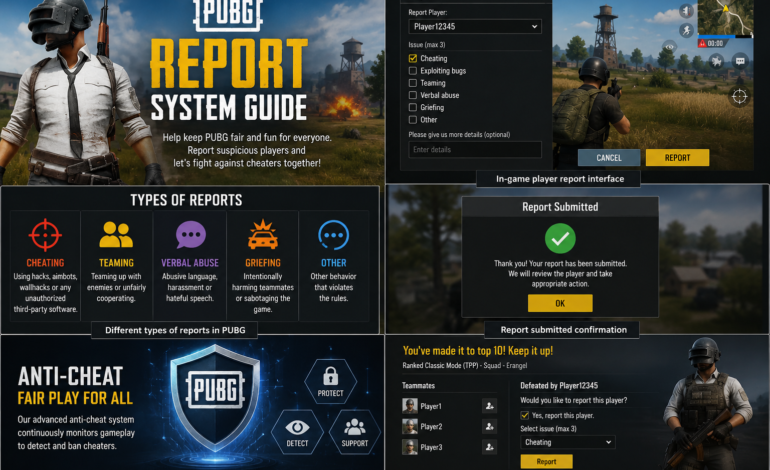
Filing an accurate PUBG cheating report or PUBG toxic player report requires choosing the correct violation category. Selecting the precise category ensures that automated filters send the case file to the correct specialized investigation queue.
A. Cheating & Hacking (Illicit Software & Hardware)
This is the most critical category within the PUBG hacker report system. Offences include:
- Aimbots & Target Lock: Software that automatically snaps crosshairs to enemy hitboxes (head, chest) instantly upon sighting.
- ESP / Wallhacks: Displaying enemy locations, health bars, inventory items, and distances through solid structures and terrain.
- No-Recoil Scripts / Macros: Custom mouse scripts or hardware adapters that counteract weapon recoil patterns perfectly.
- Speed & Flying Hacks: Manipulating client-to-server movement vectors to move at impossible speeds or float in mid-air.
- Radar Hacks / Extra-Sensory Perception: Intercepting unencrypted network packets on a second PC to view map positions in real-time.
B. Unfair Play & Exploits
Even without third-party software, players can ruin competitive integrity through an PUBG unfair play report:
- Teaming in Solo/Duo Matches: Communicating outside game channels to coordinate with enemy players and eliminate solo combatants.
- Map & Terrain Exploits: Glitching inside rocks, buildings, or under the map geometry where opponents cannot damage them.
- Stream Sniping: Intentionally joining match queues of live streamers to track their location and gain an unfair advantage.
- Stat Boosting / Win Trading: Intentionally dying to friends or secondary accounts to artificially inflate rank stats.
C. Griefing & Teammate Abuse
Team dynamics are vital in Squad matches. A PUBG abusive player report should be used when teammates engage in intentional sabotage:
- Intentional Teamkilling: Throwing grenades, firing weapons, or driving vehicles over teammates to execute them.
- Vehicle Destruction: Shooting tires or destroying squad vehicles while teammates are travelling inside.
- Loot Hoarding & Theft: Stealing items from a teammate’s kill crate or trapping allies inside small rooms with vehicles.
2.2 Method 1: In-Game Real-Time Reporting (Death Cam & Spectate)
The fastest and most direct way to submit a PUBG report player request is immediately after being eliminated during an active match.
- Watch the Death Cam: Before pressing report, observe the death cam closely. Verify if the opponent had clear line-of-sight, heard footstep audio, or if their crosshair unnaturally snapped through walls.
- Press the Report Button: On PC, press the default hotkey (R) or click the Report button at the bottom of the screen. On Mobile/Console, tap the red Report icon on the death summary screen.
- Select Specific Violation Subcategories: Do not just select “Cheating.” Check exact tags such as Auto-Aiming, Wallhack, or Movement Speed Hack.
- Submit Comments: Add a brief, factual description (e.g., “Player snapped 180 degrees through smoke without visual line of sight”).
- Confirm Submission: Hit Confirm. The game client records the server tick timestamp and flags the last 60 seconds of replay telemetry for security review.
2.3 Method 2: Post-Match Reporting (Career & Match History)
If you exited the match too quickly or realized a player was cheating only after reviewing your career stats, you can execute a PUBG report player after match action easily:
How to Report PUBG Player After Match (Step-by-Step):
- Return to the main lobby and navigate to the Career tab.
- Select Match History and find the specific match.
- Click on the Match Summary / Scoreboard view.
- Locate the suspect’s player name in the kill feed or score list.
- Right-click or select their profile card and choose Report Player.
- Fill out the report reasons and submit the form.
2.4 Method 3: Advanced Replay System Reporting
PC players have access to the powerful 3D Replay system, which records full match telemetry within a 1-kilometer radius around the character. This is the single most effective tool for filing a PUBG report cheater claim.
- Enable Replay Recording in the Gameplay Settings menu prior to your matches.
- Open the Replay tab in the main menu, load the match file, and navigate to the exact timestamp of the incident.
- Press X to toggle X-Ray / Vision Outline mode. Observe if the suspect tracks enemy players through solid terrain or walls.
- Press J to open the timeline, click on the suspect’s player icon, and press the Report button embedded within the 3D replay timeline UI.
2.5 Method 4: External Web Tickets via PUBG Game Support
For high-profile violations, complex DMA cheat hardware, stream sniping syndicates, or severe real-world threats, using the in-game report button may not suffice. Submitting a ticket to PUBG game support provides a direct line to human security managers.
Requirements for Web Support Tickets:
- Exact suspect player nickname (case-sensitive) and Player ID (UID).
- Server Region (e.g., NA, EU, ASIA, SEA).
- Unedited video recording (uploaded to YouTube/Vimeo as unlisted) showing the player’s perspective or your death cam.
- Match ID (found at the bottom of the screen in small text during matches).
To file a ticket, navigate to support.pubg.com, log into your account, click Submit Request, select Reports & Restrictions, and attach your video link along with the detailed description.
The Investigation Lifecycle, AI Detection, & Status Tracking
3.1 What Happens After Reporting a Player in PUBG?
Many players wonder: “What happens after reporting a player in PUBG?” or “How long does PUBG report take to resolve?” The journey from filing a complaint to account enforcement follows a strictly automated and human-verified multi-stage pipeline.
[ Step 1: Report Submission ]
            │
            ▼
[ Step 2: Automated Telemetry & Weight Assessment ]
            │
            ▼
[ Step 3: Temporary 24-Hour Lockdown (If Threshold Met) ]
            │
            ▼
[ Step 4: AI Replay Analysis & Deep Memory Inspection ]
            │
            ▼
[ Step 5: Final Verdict: Permanent Ban OR Account Cleared ]
            │
            ▼
[ Step 6: In-Game Confirmation Mail Sent to Reporting Player ]
Phase 1: Threshold & Weight Accumulation
When an account receives a PUBG player complaint, the system does not instantly issue a permanent ban. Instead, it calculates the Report Confidence Index. If an account receives multiple distinct reports from different non-queued players within a short period (e.g., 5+ reports across 3 consecutive matches), the security engine triggers an automated temporary restriction.
Phase 2: The 24-Hour Temporary Ban (Investigation Window)
The temporary 24-hour suspension serves as a safety measure. It removes the suspect account from active matchmaking queues while backend anti-cheat servers run diagnostic routines. During this window:
- The account’s recent replay files are scanned by machine learning models.
- Binary signatures of processes running during match execution are audited against known cheat databases.
- Server-side mouse trajectory telemetry is evaluated for non-human mathematical precision (instant zero-millisecond snap movements).
Phase 3: Final Enforcement Action
If security checks confirm third-party software utilization or severe misconduct, the system upgrades the temporary status to a Permanent Ban. In addition, Krafton executes a Hardware ID (HWID) Ban, locking the motherboard, MAC address, and GPU serial signatures of the cheater’s system to prevent them from simply registering a new account on the same PC.
3.2 How to Check Status & Ban Records
Keeping track of your submitted claims is transparent thanks to integrated tracking mechanisms. If you want to know how to check PUBG report status, follow these methods depending on your platform:
A. Checking In-Game Notifications (PC & Console)
When action is taken based on a PUBG report review, Krafton delivers an automated system message directly to your main menu inbox:
- Open the Notifications envelope icon in the top right corner of the main lobby.
- Look for messages titled “Ban Notice / Action Taken”.
- The notification will display the punished player’s username, the duration of the ban (e.g., 24 Hours, 365 Days, or Permanent), and the date of enforcement.
B. PUBG Mobile Security Center (“Ban Pan” System)
For mobile players, the PUBG mobile report player guide features an in-depth operational center known as the Security Center or Ban Pan System:
| Security Center Feature | Functionality | How to Access |
| My Reports Tab | Displays real-time progress status (Under Review, Pending Analysis, Penalty Applied). | Security Center → My Reports |
| Eagle System (Video Review) | Allows trusted community investigators to review anonymized player replay clips and vote on guilt. | Security Center → Video Review |
| Daily Ban Log | Publicly lists thousands of accounts permanently banned within the last 24 hours. | Security Center → Ban List |
3.3 How Many Reports Are Needed to Ban a Player?
A common misconception among players is asking: “How many reports to ban a PUBG player?” The answer depends entirely on the nature of the violation:
Reports do not equal instant permanent bans. Accumulating 5 to 10 reports within a short window will reliably trigger a temporary 24-hour suspension for investigation. However, a permanent ban requires 100% technical confirmation from anti-cheat signatures or replay verification. Even if a player receives 100 reports, if server telemetry proves their inputs are 100% legitimate (e.g., an elite esports professional having a high-kill game), the temporary restriction is lifted, and the account is cleared without penalty.
Anti-Spam Safeguards: Sending 20 reports against the same opponent from your own single account only counts as 1 unique report thread. The system filters out redundant submissions from the same squad to prevent targeted abuse.
Technical Troubleshooting, Community Guidelines & Future Outlook
4.1 Troubleshooting Common System Errors
Occasionally, players encounter technical glitches when attempting to submit a PUBG violation report. Below are resolution steps for common technical hurdles:
Problem 1: PUBG Report Button Not Showing
If the Report button is missing on your death screen or match summary:
- Server Connection Delay: If the match session closes abruptly or server synchronization drops, the UI may hide report options. Wait 60 seconds or restart the client to view the match under Career History.
- Custom Match Rulesets: Certain custom rooms or event modes disable the native death screen report UI. Use the 3D Replay system or submit a web ticket via PUBG game support instead.
- UI Overlay Resolution Glitch: Running custom resolutions (e.g., stretched 4:3) can occasionally push the report button outside the renderable screen bounds. Reset resolution scaling to default.
Problem 2: PUBG Report System Not Working / Server Error
If clicking submit results in an error message like “Failed to submit report. Please try again later”:
- Clear your local game cache files (Steam: Verify Integrity of Game Files).
- Check if Krafton server maintenance is underway. During patch deployments, backend reporting database connections are temporarily paused.
- If the in-game pipeline remains unresponsive, save your local replay file (located in
%localappdata%\TslGame\Saved\Demos) and attach it to a web ticket.
4.2 False Reports, Abuse of System, & Account Trust Scores
To ensure the integrity of the PUBG complaint system, Krafton implements an internal Reporter Reputation Score. Players who misuse the reporting tool face consequences:
- Rage Reporting: Intentionally reporting every opponent who eliminates you—simply because you lost a gunfight—degrades your account’s report reputation weight.
- False Spam Campaigns: Organizing mass reporting campaigns against legitimate content creators or rivals can result in warnings or temporary reporting suspensions for the abuse initiators.
- Legitimate High-Skill Protection: Professional players and skilled shooters with high headshot percentages are protected by whitelist telemetry baselines to prevent automated mass-report bans.
4.3 Best Practices for Effective Community Reporting
To ensure your PUBG community report leads to swift enforcement action, adhere to these guidelines:
- Always Spectate Before Reporting: Take 30 seconds to watch the suspect’s perspective in spectate mode or death cam to confirm erratic behavior.
- Be Specific with Categories: Distinguish clearly between aim hacks, wallhacks, and macro usage rather than selecting all boxes indiscriminately.
- Use Web Tickets for Systemic Cheating: If you encounter paid rank-boosting squads or accounts advertising cheat websites over voice channels, record video footage and submit it to PUBG Support.
- Keep Replays Saved: Lock key match replays in your client so they are not overwritten by newer matches before an investigation concludes.
4.4 The Future of PUBG Anti-Cheat (2026 and Beyond)
As cheat developers leverage generative AI models and hardware level-0 exploits, Krafton’s security teams are deploying next-generation countermeasures within the PUBG report system 2026 ecosystem:
- Behavioral Biometrics Analysis: Machine learning algorithms monitor microscopic hand jitter and recoil correction curves to differentiate human muscle memory from algorithmic macro scripts.
- Kernel-Level & Virtualization Guarding: Advanced system protection prevents cheat tools from masking inside hypervisors or secondary operating systems.
- Real-Time Voice Toxicity NLP: Automated Natural Language Processing (NLP) models monitor voice channels in real-time, instantly muting and flagging players who use hate speech or toxic harassment.
4.5 Summary & Final Thoughts
The PUBG report system remains the single most impactful tool available to players in the ongoing battle for clean, fair, and competitive gaming. By understanding how to file a PUBG player report across all available methods—in-game, post-match, replay, and web support—you actively contribute to preserving the battle royale experience for millions of players worldwide.
Remember: Every legitimate PUBG cheating report helps train security machine-learning models, strengthens hardware ban databases, and keeps the battlegrounds fair for everyone. Stay vigilant, report responsibly, and see you on the Battlegrounds!